mysite/setting.py 파일을 열어보세요. 이 파일은 Django 설정을 모듈 변수로 표현한 보통의 Python 모듈입니다.
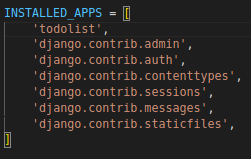
기본으로 설치되어있는 app들입니다. 여기에 저희가 만든 앱을 추가합니다.

이제부터 mysql 데이터베이스를 연동해보겠습니다.
1. 커넥터 설치
Python에서 MySQL 서버와 통신을 할 수 있게 해주는 파이썬 용 데이터베이서 커넥터(Databaser Connector)를 설치합니다. mysqlclient를 사용하는 걸 권장하고 있어서 설치해주도록 합시다.
pip install mysqlclient
2. settings.py 수정
디비 연결을 위해 settings.py에서 DATABASES 항목을 수정해줍니다.
아래 항목은 사용자에 맞게 수정해주시면됩니다.
DATABASES = {
    'default': {
        'ENGINE': 'django.db.backends.mysql', # 1
        'NAME': 'test',  # 2
        'USER': 'root',  # 3
        'PASSWORD': 'root',  # 4
        'HOST': '127.0.0.1', # 5
        'PORT': ''  # 6 공백으로 냅두면 default 3306
    }
}
#1 :사용할 엔진
#2 : 연동할 MySQL의 데이터베이스 이름
#3 : DB 접속 계정
#4 : DB 접속 계정 비밀번호
#5 : 실제 DB 주소
#6 : 포트번호
3. django에서 디비에 접근하여 사용하기 위해 models.py를 생성
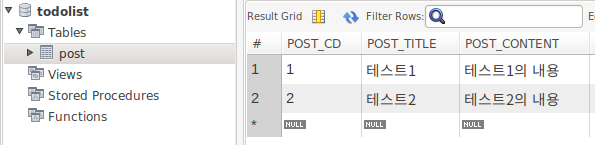
기존에 사용하던 디비가 있다는 가정하에 진행하겠습니다. 만약 기존에 사용하던 디비가 없다면 models.py를 직접 만들어서 마이그레이션 하시면 models.py기반으로 디비 테이블이 자동으로 생성됩니다.
python manage.py inspectdb > models.py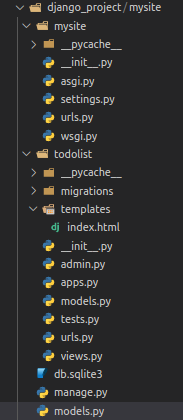
이 파일을 열어 todolist/models.py에 복사 붙여 넣기 합니다.
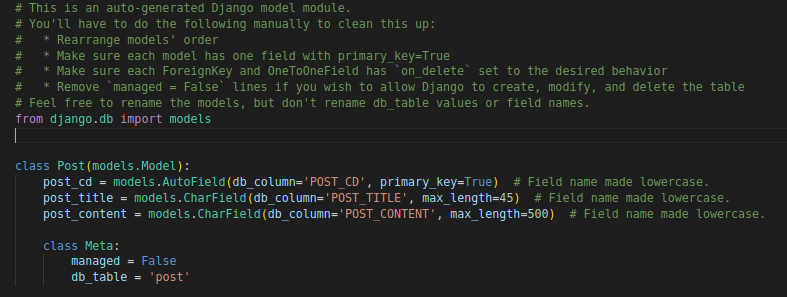
붙여 넣기 후 아래 명령어를 콘솔에 입력합니다. 이렇게 진행하시면 디비 연동은 끝났습니다.
python manage.py makemigrations todolist

python manage.py migrate
이제 연동된 내용을 출력해보겠습니다.
1. todolist/views.py 코드 추가
from .models import Post #Post모델 불러오기
def post_view(request):
    posts = Post.objects.all() #Post테이블의 모든 객체 불러와서 posts변수에 저장
    print(posts)
    return render(request, 'index.html',{"posts": posts})
2. todolist/urls.py 코드 추가
path('post', views.post_view, name='post_view'),
3. index.html 코드 작성을 위해 todolist 하위에 templates 폴더 생성, 이후 dotolist/templates/index.html 작성
<table class="table-contents" style="padding:10px">
  <tr>
    <th>제목</th>
    <th>내용</th>
  </tr>
  {% for post in posts %}
    <tr>
      <td>{{post.post_title}}</td>
      <td>{{post.post_content}}</td>
    </tr>
    {%endfor%}
  </table>
4. settings.py TEMPLATES 항목 수정
'DIRS': [],
# 비어있는 DIRS를 아래와같이 수정
'DIRS': [BASE_DIR / 'todolist' / 'templates'],
최종 코드 수정 내용
# todolist/views.py

from django.shortcuts import render
# Create your views here.
from django.http import HttpResponse

def index(request):
    return HttpResponse("Hello, world!")

from .models import Post #Post모델 불러오기
def post_view(request):
    posts = Post.objects.all() #Post테이블의 모든 객체 불러와서 posts변수에 저장
    print(posts)
    return render(request, 'index.html',{"posts": posts})
# todolist/urls.py
from django.urls import path

from . import views

urlpatterns = [
    path('', views.index, name='index'),
    path('post', views.post_view, name='post_view'),
]

이제 코드 수정은 모두 끝났습니다.
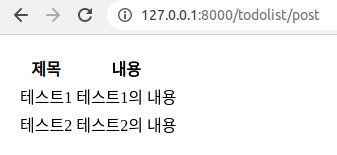
python manage.py runserverdjango를 실행하신 후 http://127.0.0.1:8000/todolist/post 접속하셔서 아래와 같은 출력이 나오신다면 성공입니다.
'Backend > Django' 카테고리의 다른 글
| Django 뷰 페이지 만들기 (0) | 2023.07.01 |
|---|---|
| Django 설치하기 (0) | 2023.06.30 |